Powered by Gemini AI

Create Short Videos
with AI Magic

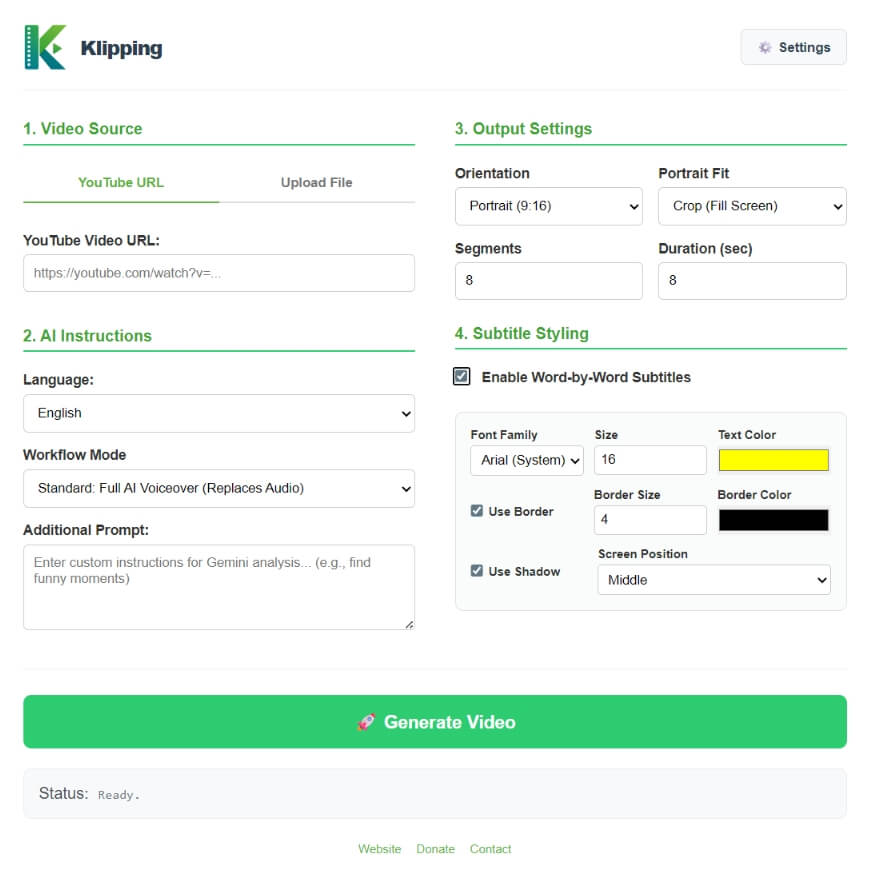
Transform any video or YouTube link into engaging short clips with AI voiceover, automatic subtitles, and smart segmentation — in 16 languages.

Download Free
45,000+
Downloads
2,400+
Contributors
16
Languages
AI Processing Complete in 5 min
Subtitles Auto-generated

Everything You Need to Create

Powerful AI-driven tools that make video editing effortless and professional.

1

AI Clip Selection

Gemini AI analyzes your video and automatically selects the most engaging moments for short-form content.

2

AI Voiceover

Generate natural-sounding voiceovers in multiple languages with customizable voice profiles and speed.

3

Smart Segments

Control segment count and duration. Portrait or landscape — your call.

4

Styled Subtitles

Word-by-word subtitles with full control over font, color, size, border, shadow, and position.

Three Simple Steps

From raw video to polished short clip in minutes, not hours.

1. Add Your Video

Paste a YouTube link or drag & drop your video file into the app.

2. Configure AI

Choose your language, workflow mode, and add custom prompts for Gemini.

3. Generate & Export

Let AI create your clips, preview them, customize, and export in mp4.

Supports 16 Languages

Create content for a global audience with AI-powered transcription and voiceover in multiple languages.

English
Spanish
French
German
Portuguese
Chinese
Japanese
Korean
Arabic
Hindi
Italian
Russian
Turkish
Dutch
Polish

Google Gemini Models

Choose the AI model that fits your needs — from fast previews to deep analysis.

Gemini 3 Flash
Gemini 3.1 Pro
Gemini 3.1 Flash Lite
Gemini 2.5 Pro
Gemini 2.5 Flash

Get Klipping Free

Available for Windows. No account required.

Windows
Windows 10+ • 64-bit
Download .exe
6 downloads

Frequently Asked Questions

Everything you need to know about Klipping.

Klipping is a free desktop application that uses Google Gemini AI to transform long videos into engaging short-form clips. It handles everything from AI-powered moment detection to voiceover generation and subtitle styling.

Klipping only supports MP4. But you can also paste a YouTube link and Klipping will download and process the video automatically.

Our AI analyzes multiple factors including speech patterns, visual engagement, topic transitions, audience retention signals, and emotional peaks. It uses advanced language models to understand the content context and identify moments that are most likely to capture viewer attention in short-form format. You can also input additional prompt.

Klipping supports 15+ languages for transcription and captioning, including English, Spanish, French, German, Portuguese, Chinese, Japanese, Korean, Arabic, Hindi, and many more. The AI can also translate captions between languages automatically.

Yes. Klipping processes videos locally on your machine. Your content never leaves your computer. We don't store, collect, or share your video data or your API key with any third parties.

Klipping runs on Windows 10+. A minimum of 8GB RAM is recommended. For AI features, you'll need a Google Gemini API key, the free tier is sufficient.

Absolutely! Klipping is totally free, no string attached. Although you can also DONATE if you want :)

Well because everything is bundled inside it. The size for FFMPEG it self is 98MB, we use it for editing video, audio and subtitle. We also use yt-dlp for download the video from youtube. Whisper for tracking timestamp subtitle, and gTTS for creating the text-to-speech feature. So yeah that's why it's so big.

Ready to Create Amazing Shorts?

Download Klipping today and turn any video into engaging short-form content with the power of AI.

Download Free